Starting a business does not need to begin with a hosting bill.
If you need a website for a new business, side project, freelance service, or online store, there are now ways to get a real website online without paying for hosting upfront.
If the idea is still untested, start with business idea validation before spending time polishing the first version of the site.
The important distinction is this:
Building a website and publishing a website are not the same thing.
A tool may let you design a website for free, but the cost can appear when you actually want to make that website public.
So if your goal is to launch with as little upfront cost as possible, the useful question is not only:
“Can I build a website for free?”
It is:
“Can I actually publish it and let customers visit it for free?”
What does publishing a website mean?
Publishing is the point when your website becomes accessible on the internet.
Before publishing, a website may exist only inside an editor or as files on a computer. After publishing, it has a web address that other people can open.
Traditionally, getting to that point could involve several separate things:
- a website builder or developer
- web hosting
- a domain
- configuration
- ongoing maintenance
Modern platforms can combine some or all of those steps.
That can be especially useful for a solopreneur who wants to get a business online before committing money to infrastructure.
Can you really publish a website for free?
Yes.
Some platforms let you publish a website without paying for hosting upfront.
The trade-off on a free plan is often that the site uses an address provided by the platform rather than a custom domain that you own.
That can be completely reasonable when you are:
- launching a new business
- testing an offer
- starting a side project
- creating your first online presence
- trying to keep startup costs close to zero
You can decide later whether a custom domain or other paid infrastructure is worth adding.
At the beginning, the most important step may simply be to get the business online.
Two common ways to get a website online
There are two broad approaches.
Option 1: Build and host it yourself
You can create a website yourself and use hosting that has a free tier.
For technical users, this can offer a lot of control.
But it may also involve repositories, deployment settings, DNS, hosting configuration, and maintenance.
That can make sense if you enjoy managing the technical side.
If your real goal is to start a business rather than become a web developer, those extra steps may be unnecessary.
Option 2: Build and publish from the same platform
Another approach is to use a platform that handles both website creation and publishing.
You create the website, customize it, preview it, and publish it from the same workflow.
For a solopreneur, reducing the number of separate tools and setup steps can be more valuable than having another complicated website stack.
Building and publishing with Project-B
Project-B is Inciver's Business Creation Platform for people turning ideas into operating businesses.
Its Website & Store Builder lets you:
- create a business website or online store
- customize the visual design
- add your business content and media
- add products when building a store
- preview the website
- publish it directly
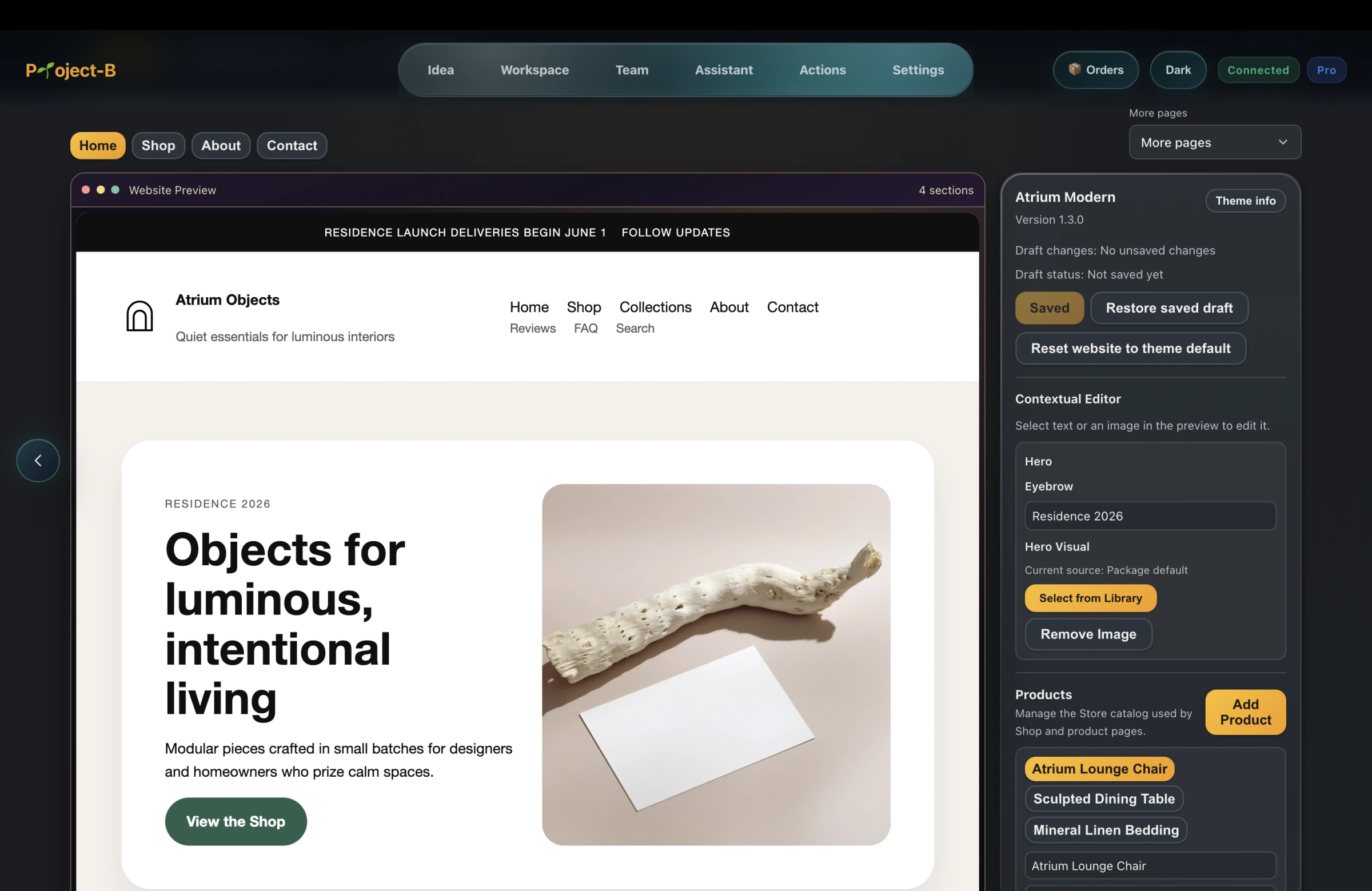
You can publish the website for free.
You do not need to buy hosting before getting your first Project-B website online.
Free publishing uses an Inciver-provided web address. A custom domain is separate and should not be confused with free publishing.
For someone starting an online business with little or no money, that means getting the website online does not need to become another immediate bill.
Why free publishing matters more than another free editor
A website sitting inside an editor is not yet doing anything for your business.
Customers cannot visit it.
You cannot send people to it.
You cannot use it as the destination for your marketing.
What matters is getting the business live.
That is why the ability to publish can matter more to a new entrepreneur than simply having access to another free design tool.
The useful outcome is straightforward:
Create the website → publish it → share it with customers.
What should your first business website include?
If the site is not built yet, use the website scope and acceptance checklist to decide what you can build yourself and what might need specialist help.
Do not overbuild the first version.
Most small businesses can begin with a focused website containing a few essential things.
A clear explanation of what you offer
Someone visiting for the first time should understand what the business does quickly.
A reason to choose you
Explain the problem you solve, the value you provide, or the result your customer receives.
Your product or service
Show what people can actually buy, request, book, or contact you about.
A clear next action
Depending on the business, that could be:
- buy a product
- contact you
- request a quote
- send a message
- book a service
Real trust signals
Use information you can genuinely support.
Do not invent testimonials, customer counts, partnerships, or results.
A small credible website is more useful than a large website filled with claims that do not mean anything.
You do not need to finish everything before launching
A common mistake is waiting until the website feels perfect.
For a new business, the first version is supposed to change.
Your offer may change.
Your pricing may change.
Your positioning may improve when you start talking to real customers.
Your design may evolve.
Publishing early gives you something real to test and improve.
That matters even more for a solopreneur because time is one of your most limited resources.
What happens after your website is live?
Publishing is one launch milestone. Put delivery, customer responses, and the next review into a step-by-step launch plan.
Publishing the website is only the beginning.
People still need to discover the business.
That can involve:
- social media
- direct outreach
- search visibility
- content
- referrals
- paid acquisition when it makes sense
Project-B is designed to connect several of those stages in the same business workspace.
Its Marketing Employee can prepare business-aware social content and, after approval, automatically publish scheduled content to supported Facebook and Instagram accounts — even while you’re asleep.
That means your website and your marketing do not have to become two completely disconnected workflows.
A practical low-cost launch path
If your objective is to start while spending as little as possible, a sensible sequence is:
- Decide what you are selling.
- Define who it is for.
- Create a focused website or store.
- Publish it without adding unnecessary upfront infrastructure costs.
- Start showing the business to real people.
- Learn what customers respond to.
- Improve the offer and website based on evidence.
- Spend money only where it starts producing a measurable benefit.
Your first website does not need to make your business look enormous.
It needs to help your business start.
Start with the outcome that matters: going live
There are many ways to build a website.
For someone starting a business, the more useful question is often:
“How quickly can I turn this into something real that customers can visit?”
Project-B lets you build a business website or store and publish it for free from the same workspace.
Open Project-B in your browser to build and publish your first business site or store.
New users currently receive 3 days of Project-B Pro free with no credit card required.
Build it. Publish it. Start using it.