You can start a business without hiring a website developer when your first online presence uses standard pages and a straightforward customer action. Define the offer, prepare the content, choose a website or store builder that supports your needs, and test the result before sharing it. Custom development becomes more relevant when the business depends on complex behavior the builder cannot reliably provide.
This does not mean every part of starting a business is solved by creating a website. You still need a viable offer, a way to serve customers, and the resources and requirements appropriate to your activity.
Separate the business from the website
Start by asking what the site must help a visitor do: understand a service, request a quote, view a catalog, or place an order. A first website is not required to reproduce every feature of an established competitor.
For a hypothetical mobile furniture-repair service, a useful first site could explain the repairs offered, show genuine work, state the service area, and let someone request an assessment. A custom customer portal may be unnecessary while bookings are handled manually.
Write two lists: “needed for the first customer” and “could help later.” Put features in the first list only if their absence blocks a real customer action or essential requirement. If budget is the central constraint, the lean business-starting guide helps place website spending alongside other priorities.
Choose a builder when the workflow fits
A builder is a reasonable starting route for an information site, standard service pages, or a catalog and store supported by its existing features. Check the actual published result, not just an attractive editor preview.
- Editing: Can you update text, images, products, and contact details yourself?
- Customer actions: Does it support the inquiry, booking, or purchase path you need? Verify each feature rather than assuming it exists.
- Publishing: What address, hosting, and ongoing costs are included?
- Maintenance and portability: Who can access the account, how is content retained, and what happens if you move later?
- Language and access: Does the final site work on mobile, with keyboard navigation, and in your audience's language?
Consider a developer or relevant specialist when you need unusual integrations, complex permissions, custom transaction rules, sensitive-data handling, or a workflow outside the platform's capabilities. Describe the requirement and test the limitation first. Hiring for a defined gap is more useful than commissioning an undefined “professional website.”
Write a small website brief
A builder still needs clear inputs. Use this compact specification before selecting layouts:
| Decision | What to write |
|---|---|
| Audience and offer | Who visits, why they care, and what you provide |
| Main action | One primary next step: inquire, request, book, or buy |
| Page content | Offer, scope, relevant proof, practical details, contact or order path |
| Owner | Who receives inquiries and updates the site |
| Acceptance check | What a real visitor must be able to complete successfully |
A service may need one focused page at first. A store may need product details, variants where relevant, availability, delivery information, and clear order policies. Page count follows the buying task; more pages do not automatically create more trust. If retail is your model, the guide to starting an online store covers the product, payment or order, delivery, returns, and support decisions around the site.
Prepare content before adjusting every visual detail
Write the offer in plain language. State who it helps, what is included, any important limits, and what happens after the visitor acts. Use genuine photos or clearly labeled demonstrations, and only use assets you have permission to publish.
Prepare contact details and product information in one place. Check names, prices, units, availability, and service areas. Missing information creates more friction than an imperfect shade of blue.
Choose a clear heading structure and descriptive button labels such as “Request a repair assessment.” Keep text readable on a phone, describe informative images with useful alt text, and avoid relying on color alone to convey meaning. For Arabic content, test right-to-left layout and mixed-language names instead of assuming a translated page will display correctly.
Test the complete customer path
Previewing a page is not enough. Ask someone unfamiliar with the business to explain the offer and complete its main action. Watch where they hesitate without coaching them.
- Open the published or test address on desktop and a phone.
- Check navigation, buttons, contact links, and any language options.
- Submit a clearly marked test inquiry and confirm it reaches the right person.
- If you take online orders, verify the supported order and payment flow safely before accepting real orders.
- Check the confirmation, response responsibility, and process for handling an error.
- Remove placeholder content, sample prices, and unsupported claims.
Use only test information you are entitled to submit. Confirm that information collection and customer-facing policies match your actual process and applicable requirements. Do not add sensitive fields just because a form allows them.
Building the first site with Project-B
Project-B is Inciver's browser-first Business Creation Platform. You can use it directly on the Web or access its Windows app through the Microsoft Store. Its Website / Store Builder supports business websites and stores, visual editing, and product catalogs. You can publish for free on an Inciver-hosted address.
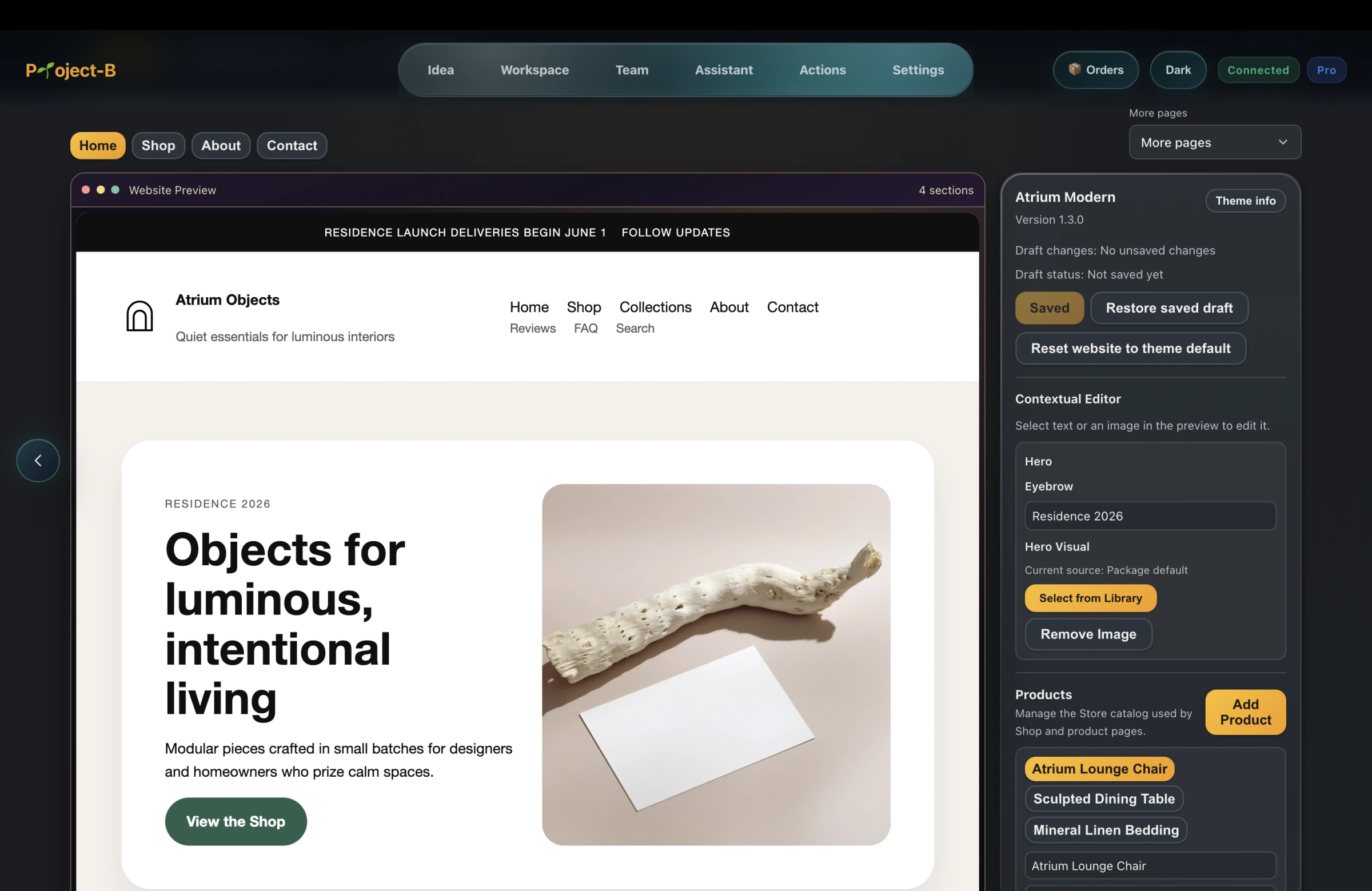
That is hosted publishing, not a free custom domain. The free website publishing guide explains the address and hosting distinction. Check that any additional booking, checkout, or integration requirement is supported before designing your business around it.
Keeping website work alongside research and marketing can reduce tool switching. You remain responsible for the offer, accurate content, and a customer process that actually works.
Publish a small site, then maintain it
When the essential path works, share the site with a small relevant audience. Use the first-customer approach to bring people with a real need, rather than waiting for a new address to attract traffic by itself.
Keep a short improvement list based on questions and failed actions. Assign someone to respond to inquiries and recheck prices, availability, and links when they change. Add features when the existing workflow reveals a need. Put those responsibilities into your launch plan, so going live has an owner beyond the day you press publish.