Social media becomes exhausting for a business for one simple reason:
It never really ends.
You publish one post.
Then you need another.
Then another.
Next week, the process starts again.
For a solopreneur or small business, the problem is rarely the few seconds required to click "Publish."
The real workload is everything around that click:
Decide what to say → create the content → prepare multiple posts → choose platforms → schedule → publish → repeat.
That is why social media automation should not mean only scheduling posts.
The useful goal is to reduce the entire recurring publishing workload without turning your business into an account that posts robotic content with no human judgment.
Quick answer: how do you automate social media posting?
A practical automated social media workflow looks like this:
- Decide which platforms actually matter to your business.
- Define a realistic posting cadence.
- Create a small set of content themes.
- Prepare content in batches instead of creating one post at a time.
- Review and approve the content.
- Connect the supported social accounts.
- Set a publishing schedule.
- Let the system publish approved content automatically.
- Check results periodically and improve the next batch.
The important word is approved.
Automation should remove repetitive execution.
It should not remove business judgment.
What does social media automation actually mean?
"Social media automation" is used to describe several very different things.
Understanding the difference helps you choose the right workflow.
Level 1: manual posting
You create the post.
You open Facebook or Instagram.
You paste the text.
You upload the media.
You publish it.
Then you repeat the process every time.
Nothing is automated.
Level 2: scheduled posting
You still create the content yourself, but you prepare it in advance and tell a scheduling tool when to publish it.
This removes the need to be online at the exact publishing time.
That is useful.
But the content-creation workload still exists.
Level 3: content automation
Software helps prepare:
- topics
- ideas
- captions
- content variations
- batches of posts
This reduces the work required before scheduling.
But if the user still needs to copy every post into another system and publish everything manually, the workflow is only partially automated.
Level 4: content preparation + approval + automatic publishing
This is the more complete workflow.
Content is prepared.
The business owner reviews it.
Approved content enters a schedule.
The system publishes it automatically to supported accounts.
That removes more of the recurring operational workload.
Scheduling is not the same as automation
A scheduler solves one specific problem:
"I already have the posts. I just do not want to publish each one manually."
That can be exactly what some businesses need.
But many small-business owners have a different problem:
"I never have the posts ready in the first place."
If you regularly open an empty content calendar, the publishing button is probably not your biggest bottleneck.
The bottleneck may be:
- deciding what to post
- finding time to write
- creating enough posts for the week
- keeping the content relevant to the business
- maintaining consistency
- remembering to prepare the next batch
This is why a more complete automation workflow can be more useful than scheduling alone.
What parts of social media should you automate?
The best candidates are repetitive processes with predictable structure.
Content batching
Instead of creating one post every day, prepare several posts in one session or workflow.
Batching reduces context switching.
You make content decisions once, then build multiple pieces around them.
Scheduling
Approved posts can be assigned publishing times in advance.
This removes the need to interrupt your day just because a post should go live.
Publishing
Once content is approved and scheduled, automatic publishing can remove the recurring manual posting task.
Recurring content planning
A business often returns to the same useful themes:
- education
- product
- problem
- customer objection
- process
- behind the scenes
- offer
- frequently asked question
A repeatable structure makes future planning faster.
Repurposing ideas
One useful business idea can become several pieces of content.
For example:
A customer question might become:
- an educational post
- a myth-vs-fact post
- a short explanation
- a product-related post
- a FAQ
The goal is not to post the exact same thing repeatedly.
The goal is to get more value from useful business knowledge.
What should you NOT fully automate?
Automation is useful precisely because some work does not need the founder's direct attention every time.
But some things still do.
Sensitive announcements
Do not automatically publish content about:
- crises
- legal issues
- major pricing changes
- sensitive customer situations
- emergencies
- controversial events
without review.
Replies and real conversations
Community engagement is not just an operational task.
A real customer may have:
- a complaint
- a buying question
- a nuanced objection
- a support issue
- feedback
Those situations often need human judgment.
Facts you have not verified
Automation can make an incorrect claim spread faster.
Review:
- prices
- features
- dates
- offers
- policies
- product facts
before approving content.
Every creative decision
A business should still have a point of view.
If the automation system is making every strategic and creative decision with no direction from the business, the result can become generic.
Automation should support the brand.
It should not replace the brand.
How to automate Facebook and Instagram posting
For many small businesses, Facebook and Instagram are still important channels for maintaining visibility and showing that the business is active.
The basic automated workflow is:
Business context → content preparation → review → approval → platform selection → schedule → automatic publishing
You can use native scheduling tools when your main problem is simply publishing already-prepared posts later.
You can use a broader automation workflow when the recurring problem includes both preparing the content and publishing it.
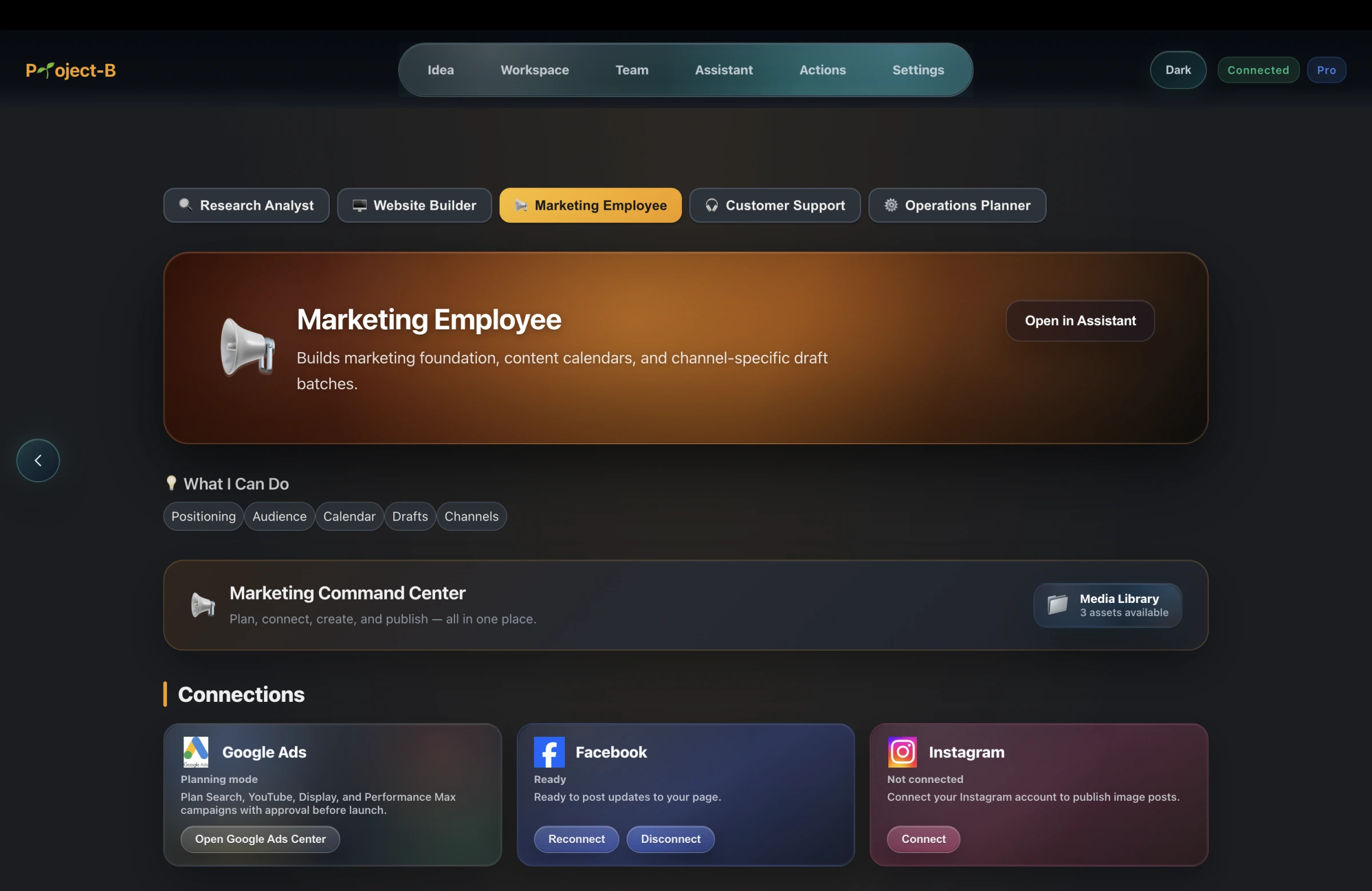
Project-B takes the second approach for its supported Facebook and Instagram integrations.
How Project-B automates the workflow
Project-B's Marketing Employee works inside the same connected workspace as the rest of the business.
That matters because marketing does not exist in isolation.
The workspace already contains context about the business.
The Marketing Employee can use that business context to prepare social content.
A typical workflow is:
- Project-B prepares a batch of business-aware posts.
- You review the proposed content.
- You approve the content you want to publish.
- You choose supported Facebook and Instagram accounts/platforms.
- You select the publishing schedule.
- Project-B keeps publishing the approved scheduled content automatically.
The business owner does not need to open Project-B at every scheduled publishing time.
Once approved and scheduled, the publishing process can continue even while you’re asleep.
That includes times when you are sleeping, working with customers, or doing something else entirely.
The important distinction is:
Project-B is not simply helping you write a caption.
It is helping reduce the recurring workflow between:
"We need content this week"
and
"The approved content is actually being published."
Why this matters more for a solopreneur
Large companies can divide social media work across:
- strategist
- copywriter
- designer
- social media manager
- approval process
- publisher
A solopreneur may be all of those people.
At the same time, the same person may also be responsible for:
- sales
- operations
- the website
- customer support
- product
- finance
- planning
That changes the economics of automation.
Saving a recurring task is not just about convenience.
It creates more founder capacity.
If social media can keep moving without requiring manual publishing every day, that time can move to work that requires the founder personally.
How to stop the daily social media posting grind
The goal should not be:
"How do I post faster today?"
The better goal is:
"How do I stop rebuilding the same workflow every day?"
A useful system has four layers.
Layer 1: decide the content themes once
Choose a small set of themes related to the business.
For example:
- teach something useful
- explain the problem
- show the product
- answer an objection
- explain a process
- share an offer
- show how the business works
You do not need a completely new content strategy every morning.
Layer 2: create in batches
Prepare several posts at once.
A weekly or multi-day batch is usually easier to manage than creating one isolated post every time you remember social media exists.
Layer 3: approve before publishing
Automation should have a clear approval boundary.
The business owner should know what is going out.
Review:
- factual accuracy
- tone
- offer
- platform suitability
- media
- timing
Layer 4: let publishing happen automatically
Once the batch is approved and scheduled, publishing should no longer require daily founder attention.
That is where automation creates real operational value.
A simple weekly automated social media workflow
Before filling the calendar, use a one-page marketing plan to connect the audience, offer, channels, and customer action you want the content to support.
You do not need an enormous content calendar.
A small business can start with a compact weekly system.
Step 1: choose the week's objective
Examples:
- educate
- promote an offer
- build trust
- explain a product
- answer recurring questions
Step 2: prepare the batch
Create enough content for the cadence you actually intend to maintain.
Do not create thirty posts because a social media guru said you need to.
Consistency you can sustain is more useful than volume you cannot maintain.
Step 3: review the posts
Check:
- Is this true?
- Is it useful?
- Does it sound like the business?
- Is the CTA appropriate?
- Is the image/media correct?
- Is anything outdated?
Step 4: choose the platforms
Do not automatically send every piece of content to every platform.
Choose where the content belongs.
For Project-B's current automatic publishing workflow, supported publishing integrations are Facebook and Instagram.
Step 5: schedule
Choose the publishing interval/timing.
You now have a queue instead of a daily reminder.
Step 6: let the approved queue run
The posts can publish automatically according to the configured schedule.
You do not need to be actively using the application at each publishing time.
Step 7: review what happened
Automation does not remove learning.
Look periodically at:
- what received attention
- what generated useful conversations
- what people ignored
- what brought website visits
- what led to business actions
Use that information to improve the next batch.
Automatic posting does not mean posting more
One of the easiest mistakes with automation is increasing volume simply because publishing became easier.
That is not automatically better.
Automation should improve consistency.
It should not create noise.
A business does not need to fill every empty hour with another post.
The useful question is:
Does this content help the right person understand, trust, remember, or act on the business?
If not, automation will only publish weak content more efficiently.
How often should a business post?
There is no universal posting frequency that is correct for every business.
The right cadence depends on:
- platform
- audience
- content quality
- available material
- business goals
- how quickly you can learn from results
A small business is better starting with a realistic cadence it can maintain than setting an aggressive schedule that produces low-quality content.
Automation makes consistency easier.
It does not determine the correct strategy for you.
Should you automatically post the same content to Facebook and Instagram?
Sometimes.
But not always.
The audience, visual format, caption style, and user behavior can differ across platforms.
A useful automation workflow should not force you to treat every platform as identical.
For some posts, the same core message may work well on both Facebook and Instagram.
For others, the content or presentation may need adjustment.
The important point is that automation should reduce unnecessary manual work without removing platform judgment.
Social media automation for small businesses
Small businesses often have two constraints:
limited team capacity
and
limited time
That means the best automation system is usually not the one with the largest feature list.
It is the one that removes the actual recurring bottleneck.
Ask:
Do I already have content ready?
If yes, scheduling alone may solve most of your problem.
Do I struggle to create enough content?
Then content preparation matters as much as scheduling.
Do I create posts but forget to publish them?
Automatic publishing matters.
Am I running the business alone?
Then reducing context switching may be more important than advanced enterprise analytics.
Do I need real customer conversations?
Do not automate them away.
The goal is not maximum automation.
The goal is the right automation.
Social media automation for solopreneurs
For a solopreneur, social media often competes directly with higher-value founder tasks.
You may need to choose between:
- writing tomorrow's post
- following up with a customer
- fixing the website
- improving the offer
- fulfilling an order
- answering support
The social account still needs consistency.
But the founder cannot spend the entire day feeding it.
That is why a workflow that combines preparation, approval, scheduling, and automatic publishing can be more useful than a tool that only solves one step.
If you are trying to start the rest of the business with little or no money, read: How to Start an Online Business With Little or No Money in 2026
Your social media should have somewhere to send people
Social content is usually not the final business outcome.
It should help people discover, understand, remember, or act on your business.
Often, that means eventually sending them somewhere useful:
- a website
- a store
- a product page
- a contact path
- an offer
If your business does not have a website yet and you are trying to keep costs low, read: How to Publish a Business Website for Free in 2026
Project-B also includes a Website & Store Builder that can build and publish a business website or store for free.
That means the website people discover from your social content can live in the same broader business workspace as the marketing workflow.
Common social media automation mistakes
Automating before you know what good content looks like
If you do not understand what your audience finds useful, automation can multiply weak content.
Learn first.
Automate second.
Scheduling months of content without reviewing it
Businesses change.
Offers change.
Prices change.
Products change.
Old scheduled content can become inaccurate.
Treating every platform the same
Automation should not eliminate platform judgment.
Publishing unverified claims
Check facts before approval.
Posting constantly because automation makes it possible
More publishing is not automatically more marketing.
Automating customer relationships
A real reply is sometimes more valuable than another scheduled post.
Buying an expensive system when scheduling is all you need
Solve the actual bottleneck.
Buying a scheduler when content creation is the bottleneck
Again: solve the actual bottleneck.
A 7-day setup for social media automation
Day 1: choose the channels
Decide which channels actually matter.
Do not automate six platforms simply because six platforms exist.
Day 2: define content themes
Choose four to six repeatable categories.
For example:
- education
- problem
- product
- objection
- proof
- offer
Day 3: prepare your first batch
Create several posts based on those themes.
Day 4: review
Fix weak copy.
Check claims.
Check visuals.
Check CTAs.
Day 5: connect supported accounts
Connect the business accounts you want the publishing system to use.
Day 6: schedule
Set a realistic publishing cadence.
Day 7: stop manually posting every item
Let the approved queue publish automatically.
Your role changes from:
manual publisher
to:
editor and decision-maker.
That is a much better use of founder attention.
How to evaluate whether automation is working
If the main challenge is getting initial sales rather than maintaining a posting rhythm, use the first-customer acquisition approach to test the offer through relevant conversations.
Do not measure success only by whether the software successfully posted something.
Publishing is an operational metric.
The business still needs outcomes.
Watch for signals such as:
- profile visits
- website visits
- relevant messages
- inquiries
- signups
- leads
- product interest
- sales where applicable
- repeat engagement from the right audience
The purpose of automation is to make execution more reliable.
The purpose of marketing is still to create business results.
Where Project-B fits
Project-B is Inciver's Business Creation Platform.
Its Marketing Employee is designed around the complete recurring workflow rather than only the final publishing click.
Inside the business workspace, Project-B can prepare business-aware social content.
The user reviews and approves the content.
The user selects supported Facebook and Instagram destinations and the publishing schedule.
Project-B can then continue publishing the approved scheduled posts automatically.
That means the founder does not have to manually reopen every social platform at every publishing time.
The process can keep moving while the founder is offline.
It can keep moving while the founder is working on another part of the business.
It can keep moving while the founder sleeps.
This does not mean the founder stops thinking about marketing.
It means the founder spends more time making decisions and less time repeating publishing operations.
Automate the repetition, keep the judgment
Good social media automation does not remove the business owner.
It changes where the business owner spends attention.
Instead of:
remember to post → open platform → copy content → upload → publish → repeat
the workflow becomes:
plan → review → approve → let the system execute → learn
That is the real opportunity.
You are not trying to automate being human.
You are trying to stop spending human attention on the same operational step every day.
Open Project-B in your browser when you are ready to put the publishing workflow into practice.
New users currently receive 3 days of Project-B Pro free with no credit card required.